Keep API tokens out of your sandbox
Tenki swaps a placeholder for your real API token outside the sandbox, so agent code can call an API without ever holding the credential.

Guzman Pintos
10 min read
A coding agent in a sandbox usually needs to call something: the GitHub API to open a pull request, a model provider, your own staging service. The usual way to allow that is to pass a token in an environment variable. Then every process in the sandbox can read it, including a dependency's install script and an agent that just read a prompt injection in a README. Once code has read a token, it can send it anywhere the sandbox's network reaches.
In where to run code your AI agent wrote we said to put no long-lived secrets inside the sandbox. Tenki Secrets make that practical. You save a token in your workspace, the sandbox gets a placeholder, and Tenki swaps in the real value on the way out, only for requests you've allowed.
What a secret is
A secret is a named value in your Tenki workspace, such as an API token or a configuration file. The management API is write-only: you can list secrets, see their versions, rotate and revoke them, but no call returns the value.
A sandbox can use a secret in three ways:
| Your application needs | Use | Where the real value goes |
|---|---|---|
| To call an HTTPS API without receiving the token | Transparent injection | Into the outgoing request, outside the sandbox |
| A token in an environment variable | A .env file | Into your app's process inside the sandbox |
| A credential or configuration file | Secret files | Into a file inside the sandbox |
Saving a secret gives no sandbox access to it. Each sandbox names the policies and files it uses when it starts.
Calling an API without the token
Save the token. The CLI prompts for the value, so it stays out of your shell history:
tenki secrets create GITHUB_TOKENThen write a request policy that says which requests may carry it, in github-policy.json:
[
  {
    "origin": "https://api.github.com",
    "methods": ["GET"],
    "pathPrefix": "/user",
    "header": "Authorization",
    "secrets": ["GITHUB_TOKEN"]
  }
]
tenki secrets policies create github --file ./github-policy.jsonThe file holds permissions, not the token, so it can live in your repository next to the rest of your configuration.
Start a sandbox with the policy and call the API with the placeholder:
tenki sandbox create --secret-policy github

tenki sandbox exec -- curl -fsS \
  -H 'Authorization: Bearer secrets://GITHUB_TOKEN' \
  https://api.github.com/user
GitHub returns your account. Inside the sandbox, the command and the request it built contain only secrets://GITHUB_TOKEN. Tenki puts the token in after the request leaves the VM.
If your application reads its token from an environment variable, set the variable to the placeholder:
tenki sandbox create --secret-policy github \
  --env GITHUB_TOKEN=secrets://GITHUB_TOKEN
The SDKs take the same option: secretPolicies in TypeScript, secret_policies in Python and WithSecretPolicies in Go, from SDK version 1.4.0. Transparent injection needs an image with Tenki's managed HTTPS trust, and your API key needs Secrets access.
Request policies are allowlists
A policy rule names an HTTPS origin, the allowed methods, a path prefix, and one place in the request where the placeholder may appear: a header, a query parameter or a JSON field. Anything a rule doesn't allow is denied.
That includes a placeholder in the wrong place. If a request carries secrets://GITHUB_TOKEN to an origin, method, path or location that no rule allows, Tenki rejects the whole request with 403 secret_injection_denied before it opens a connection to the destination. An agent tricked into sending the placeholder to another server gets a 403, and the other server gets nothing. A placeholder somewhere Tenki doesn't substitute, like a plain-text body, goes out as the literal string secrets://GITHUB_TOKEN.
A few things to know when writing rules:
pathPrefixis a plain string prefix, so/v1also matches/v10. End a prefix with/when you mean a directory.- Prefer a header when the API supports one. Query strings end up in the destination's access logs.
- Tenki doesn't add
Bearer. Send the header in the format the API expects, with the placeholder where the token goes. - A policy controls where a secret may go, not what else the sandbox can reach. Other traffic follows the sandbox's network settings.
The request policies docs cover query parameters, JSON pointers and combining policies.
When the application needs the real value
Some tools read a credential from a file, or check that a key looks valid before sending it. For those, Tenki can write the resolved value into the sandbox. Put placeholders in a file on your machine:
GITHUB_TOKEN=secrets://GITHUB_TOKENThen pass it with a destination path:
tenki sandbox create --secret-file ./.env.example:/app/.envTenki writes /app/.env with the real token and owner-only permissions (0600). Destinations must be under /app/, /workspace/ or /home/tenki/. To launch the same app with a different token, add --secret-override GITHUB_TOKEN=STAGING_GITHUB_TOKEN.
With a template, you can point at the .env.example already in your repository. The build stores that file with its placeholders unresolved, and each new sandbox gets the current values when it launches.
This is a different trade-off from injection. Code in the sandbox can read the file, and snapshots or images made from the sandbox contain it. Use files for code you trust, and injection for everything else.
Rotating and revoking
Injected requests look up the active value every time. A rotation applies to the next request, and a revoked secret makes the next request fail. Files and environment variables are copied in when the sandbox launches, so running sandboxes keep the old value until you start new ones.
| Change | Transparent injection | Environment variables and files |
|---|---|---|
| Rotate a secret | The next request uses the new value. | Running sandboxes keep the old value. |
| Revoke or delete a secret | Further requests are denied. | Copies inside running sandboxes remain. |
| Pause and resume | Current policies and values apply. | The sandbox keeps the values it had. |
Revoking a secret in Tenki doesn't revoke the token at GitHub or anywhere else. If a token has leaked, rotate it at the provider.
How it's built
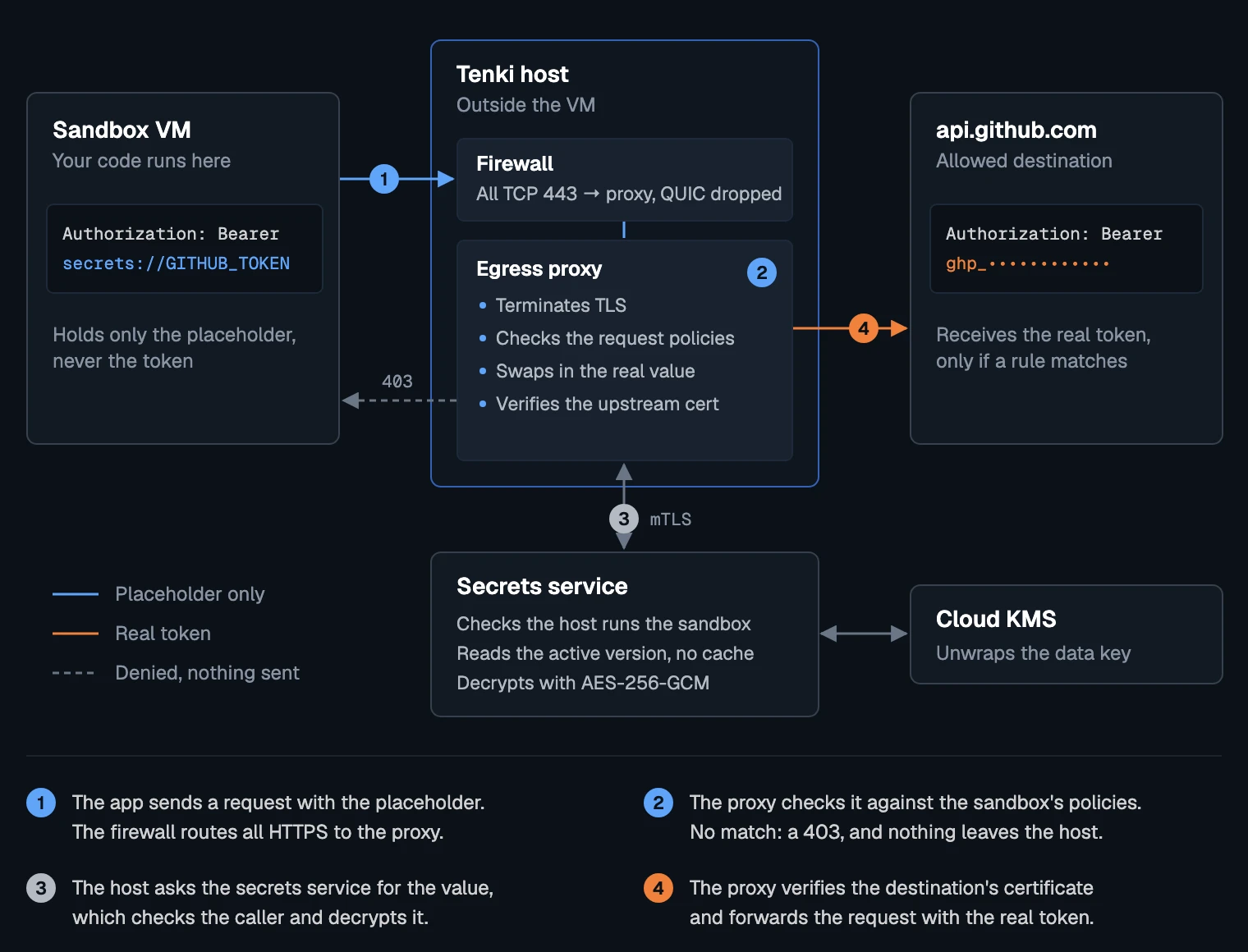
If you're going to hand us your production tokens, you should know how we handle them. This is the path an injected request takes:
Storage
Secrets use envelope encryption. Each value is encrypted with AES-256-GCM under its own random 256-bit data key, and that key is wrapped by a key in Google Cloud KMS that never leaves KMS. The database holds only ciphertext and wrapped keys.
The environment, workspace, secret, version and purpose are authenticated as additional data on both layers. A ciphertext copied to another workspace, secret or version fails to decrypt instead of decrypting under the wrong name.
The API is write-only by schema: responses have no field for a value, and the queries behind them never read the encrypted column. Versions are immutable. Updates must carry the revision you last read, and every mutation carries a request ID, so a concurrent change or a retried call can't overwrite anything. Each create, update, revoke and delete writes an audit record in the same transaction, naming the user or API key.
Managing secrets needs workspace edit permission, and an API key gets Secrets access only if you grant it. Every query is scoped to the workspace, and composite foreign keys stop a policy in one workspace from referring to a secret in another.
The request path
The proxy runs on the host, outside the VM. In a sandbox with a request policy, the host's firewall sends all outbound TCP traffic on port 443 to the proxy and drops QUIC and IPv6, so no route to the real value skips the proxy. The proxy identifies the sandbox by its VM's source address, which the host checks for spoofing, not by anything in the request.
To read the request, the proxy terminates TLS with a certificate it mints for that connection, valid for an hour. Images with Tenki's managed HTTPS trust include Tenki's CA certificate. The CA's private key stays on Tenki's hosts and never goes into a guest or an image.
Every placeholder in the request has to match a rule, or the request is rejected before the proxy connects anywhere. If all of them match, the host asks the secrets service for the values over mutual TLS. The service checks that the caller is the host running that sandbox and that each secret is active, then decrypts. Nothing is cached, so a revocation applies to the next request, even on a connection that's already open. Policies store secret IDs, not names, so a new secret created under a deleted one's name gets none of its access.
Before sending anything, the proxy opens its own TLS 1.2+ connection to the destination and verifies the certificate against public roots. It connects to the address the sandbox chose, so this check is what keeps the token from going to any server without a publicly trusted certificate for the hostname in your policy. The TLS server name must match the Host header, IP addresses are rejected as server names, and only public IPv4 destinations are allowed.
Strict parsing
Injection bugs usually come from the proxy and the destination reading the same request differently, so the proxy rejects ambiguous requests instead of guessing:
- Paths with
.or..segments,//, backslashes or percent-encoding can't match a rule. - Header secrets can't contain control characters, so they can't start a new header line. Placeholders are refused in
Host,Forwarded,X-Forwarded-*,Proxy-*, hop-by-hop and repeated headers. - Query values are URL-encoded on substitution, so a secret can't add parameters.
- JSON bodies are parsed in full. Duplicate keys, invalid UTF-8 and compressed bodies are rejected.
- Redirects aren't followed. They go back to the application, and the next request is checked from scratch.
- Connections use HTTP/1.1. CONNECT and WebSocket upgrades are refused rather than passed through unchecked.
Values stay out of errors and logs: the proxy returns fixed error codes, and service errors never include request content.
Files in the guest
Secret files reach an agent inside the VM over vsock. The agent walks the destination path without following symlinks, refuses parent directories that other users can write to, and writes the file with mode 0600 before moving it into place atomically. Substitution is one literal pass, so a value containing secrets://OTHER isn't expanded.
What this doesn't protect against
Transparent injection keeps the token away from code in the sandbox. It has limits:
- An allowed destination receives the real token and can send it back. If an API you allow echoes request headers in its response, the sandbox can read the token there. Allow only services you trust, and give each token only the permissions the sandbox needs.
- The token is in plaintext on the host that runs your sandbox while the request is forwarded. Injection protects it from the guest, not from Tenki's infrastructure.
- Secret files and environment variables are readable inside the sandbox and are captured by snapshots and images.
Getting started
- Save a secret in your workspace.
- Create a request policy for transparent injection.
- Use it in a sandbox from the CLI or an SDK.
The secrets overview explains how the three delivery methods fit together, and Tenki Sandbox has the rest of what a sandbox can do.