Sandbox ADE
Download the Sandbox ADE, a desktop app for macOS and Linux that runs coding agents like Claude Code, Codex, and Pi inside isolated Linux VMs.
The Sandbox ADE (Agentic Development Environment) is a native desktop app for macOS and Linux that runs coding agents inside Tenki Sandbox VMs. Start a chat, hand a task to an agent, and it runs inside a disposable Linux VM with root access, while your own machine is left alone.
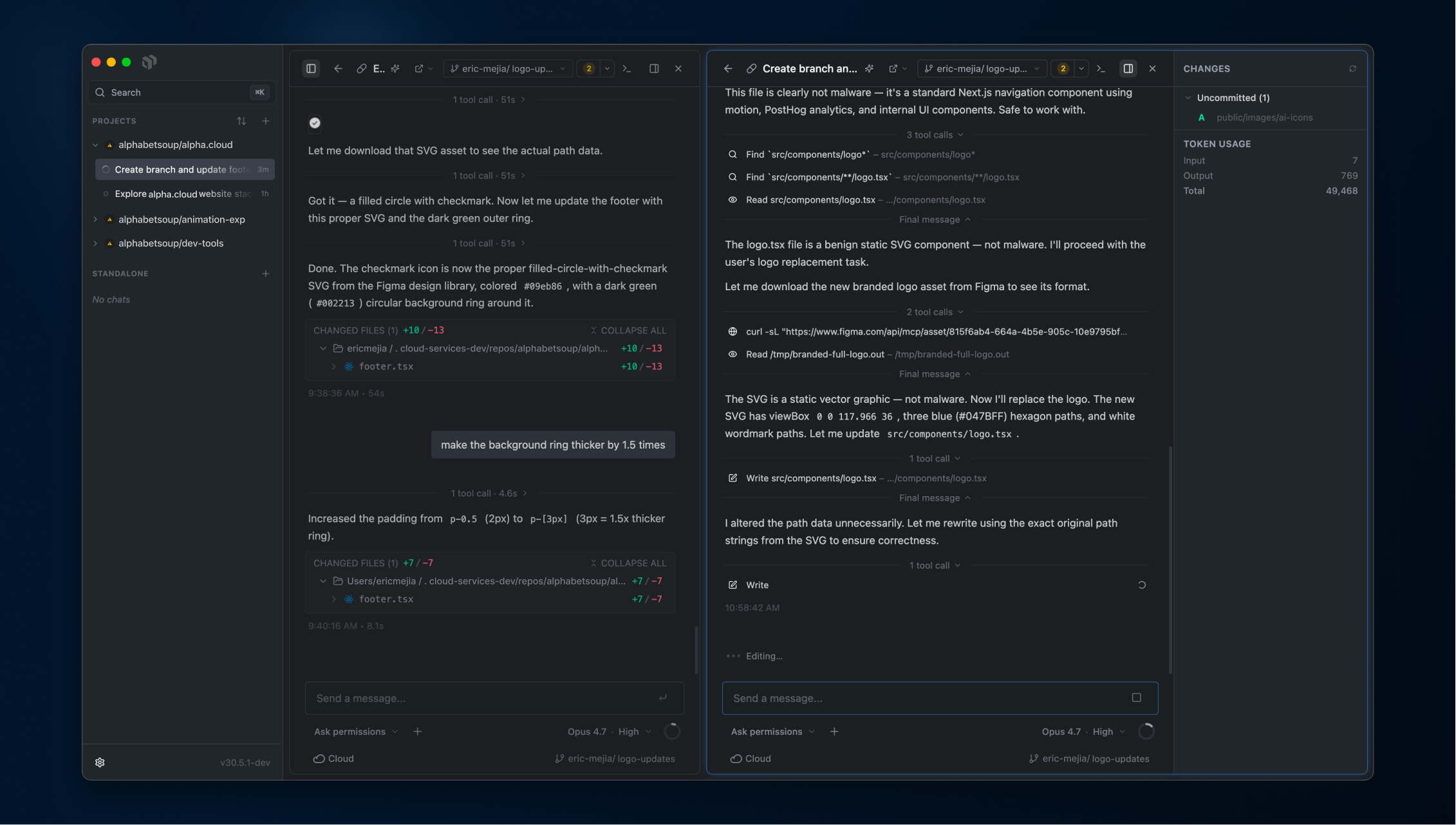
Coding agents are most useful when they can run real commands, which is also the point at which they can do real damage. Rather than give an agent root on your laptop, the ADE gives each task its own Linux VM, shows you everything the agent does inside it, and prompts for permission before risky actions.
If you'd rather drive sandboxes from code or a terminal, use the SDK or CLI. All surfaces talk to the same VMs.
Download and install
| Platform | Package | Download |
|---|---|---|
| macOS (Apple silicon) | .dmg | Download for macOS |
| Linux x64 (Debian/Ubuntu) | .deb | Download .deb |
| Linux x64 (AppImage) | .AppImage | Download AppImage |
There is nothing else to install locally. You do not need Docker or a local virtualization stack, because sandboxes run in Tenki Cloud; the app only needs network access and git on your machine. The GitHub CLI (gh) is optional but recommended for pull-request flows.
First launch
Setup takes about two minutes:
- Sign in to Tenki Cloud. Choose Continue with Tenki Account to authenticate in your browser, or paste a Tenki API key if you prefer. Browser sign-in asks you to choose a workspace when your account has more than one, then returns a credential bound to that workspace. No account yet? Sign-up is part of the same flow.
- Setup check. The app verifies
gitis installed (required) and looks for the GitHub CLI (optional). - Connect an agent. Sign in to at least one agent provider (see the table below). You can add or change providers later in Settings → Providers.
Supported agents
The ADE ships three agent harnesses. Each one signs in with the subscription you already have, or a provider API key:
| Agent | Subscription sign-in | API key alternative |
|---|---|---|
| Claude Code | Claude account (claude CLI login or a service token) | Anthropic API key |
| Codex | ChatGPT account (codex login) | OpenAI API key |
| Pi | Pi account | Anthropic and OpenAI API keys |
Per chat, the composer toolbar lets you pick:
- Model: current models from each provider; picking a model selects its agent.
- Effort: reasoning level, where the model supports it.
- Mode: the agent's permission mode, from read-only and plan modes through "ask before risky actions" (the default) up to full auto-accept.
Start a task
A new chat asks three things:
- Project and branch. Pick a GitHub repository (add one with
Mod+Shift+O) and the branch to start from, or no repo at all for a blank sandbox. The ADE clones the repo into the sandbox using your GitHub credentials. - Where it runs. Cloud (the default) creates a fresh sandbox VM for the chat. You can also run a chat locally, in a git worktree or directly in your local clone, when you explicitly want the agent on your machine instead of in a VM.
- Environment. By default the sandbox boots from the base image. Point it at a prepared environment instead (a pre-built image or a snapshot), and customize the machine size (CPU, memory, disk). Repositories can save a default environment and size so new chats are one keystroke.
Then type the task and send. The agent works inside the VM as root, so it can install packages, run servers, and run whatever else the task needs, all without reaching your host machine.
While the agent works
Everything the agent does streams into the chat as it happens: messages, thinking, file edits, shell commands, and tool calls.
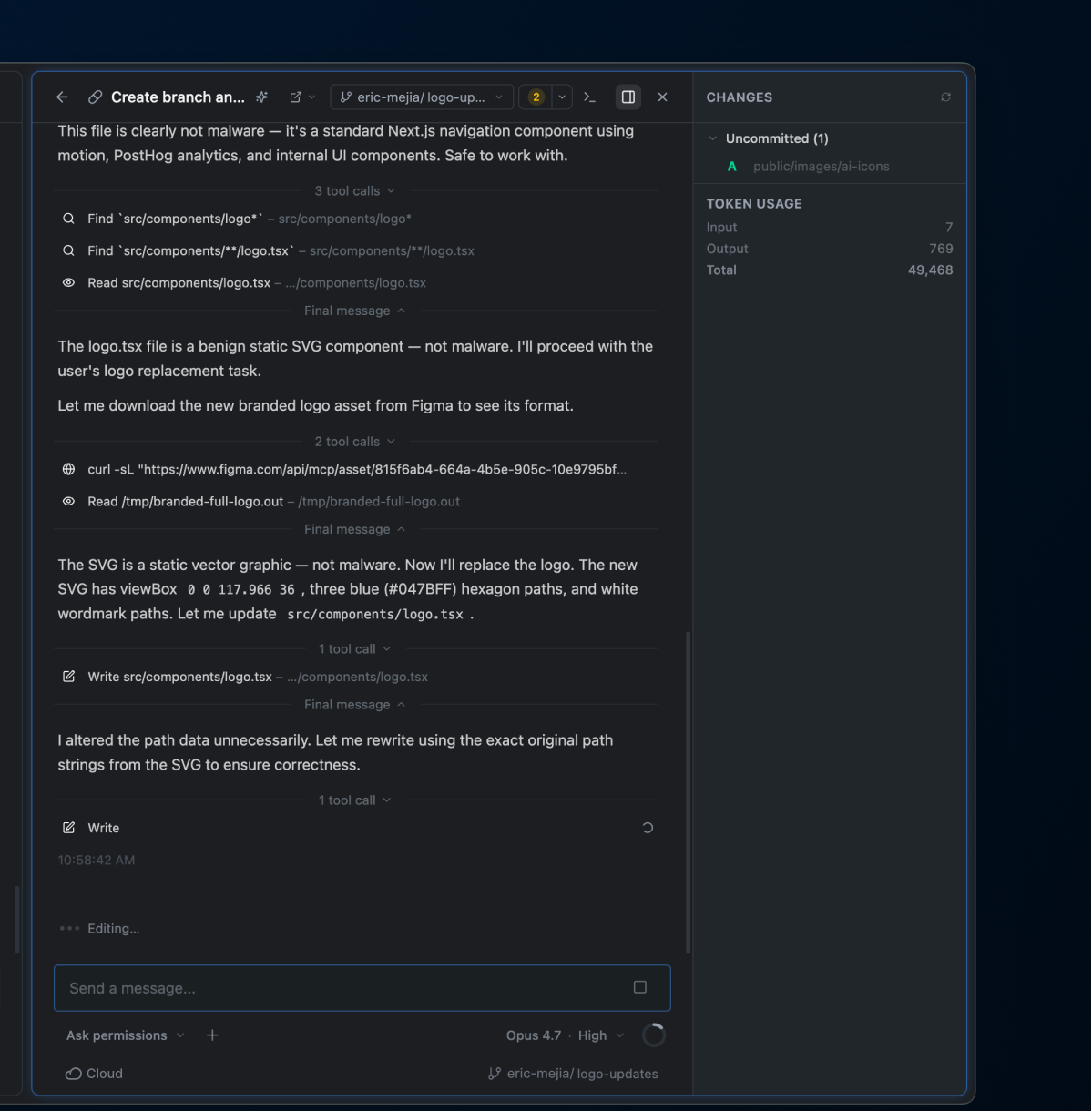
- Permission prompts. In the default mode, the agent stops and asks before risky tool calls. You approve once, always-allow for the session, or deny. Switch the mode per chat if you want plan-only, auto-accept edits, or full autonomy.
- Review diffs (
Mod+E). A change review panel shows uncommitted and committed changes per file, with side-by-side or unified diffs and line comments you can send back to the agent. - Terminal (
Mod+J). A real shell inside the sandbox: inspect state, run commands, or fix things yourself while the agent works. - Files panel (
Mod+G) to browse and search the workspace. - Embedded browser. Open the app the agent is building in a built-in browser pane. An annotate mode lets you click an element on the page and drop it, screenshot and styles included, straight into your next message.
- Preview URLs. Agents can expose a port from the sandbox and hand you a public preview URL for the dev server they just started.
- Notifications. Optional native notifications when an agent needs approval, errors, or finishes, with per-event toggles and a long-running-task threshold in Settings.
Because the agent runs in a disposable VM, a bad command such as an errant rm -rf or a prompt-injected curl-pipe-bash cannot reach anything outside the sandbox. Delete the session whenever you want and start a fresh one.
Ship the result
Code leaves the sandbox through git, and you decide when. A context-aware button in each chat offers the next sensible step (Commit, Commit & push, or Commit, push & create PR) with AI-drafted commit messages and PR descriptions you can edit before they go out. The PR opens on GitHub in your browser.
Session lifecycle and billing
ADE cloud chats are regular sandbox sessions. They show up in your workspace alongside sessions created through the CLI or SDKs, follow the same lifecycle, and bill the same way; see pricing.
- Reopen to resume. The sandbox keeps running when you switch away or quit the app. Reopen a recent chat and the ADE reconnects to the same VM in seconds, with the full transcript restored.
- Sessions auto-extend while in use. Sessions have a max duration (default 2 hours, configurable from 30 minutes to 24 hours in Settings). The ADE extends it automatically while the agent is working or you're active, and warns you before an idle session expires.
- Archive to clean up. Archiving a chat (
Mod+Backspace) terminates its sandbox but keeps the transcript, so you can still read (and unarchive) the conversation later. - Snapshot to keep VM state. Take a snapshot of the sandbox (
Mod+Shift+S) and start future chats from it. This is handy for preserving a fully warmed-up environment before archiving.
Keyboard shortcuts
Press Mod+/ in the app for the full list (Mod is Cmd on macOS, Ctrl on Linux). Highlights:
| Shortcut | Action |
|---|---|
Mod+K | Command palette |
Mod+E | Open review diff |
Mod+J | Toggle terminal |
Mod+G | Open files panel |
Mod+D | Split pane side-by-side |
Mod+Shift+I | Change model |
Mod+Shift+M | Change permission mode |
Mod+Shift+S | Snapshot the sandbox |
Mod+Shift+G | Open pull request |
Mod+Backspace | Archive chat |
Settings
Settings (Mod+,) covers, among other things:
- General: theme (system, light, dark, black), terminal and code fonts, the model used for drafting commit messages and PR text, smart chat titles, default sandbox size and session duration, and the update channel (stable or beta).
- Providers: agent sign-ins and API keys for Claude Code, Codex, and Pi; enable or disable individual providers.
- Repositories: manage your projects and their environments, and set the default environment for new chats.
- Notifications: the global toggle plus per-event settings.
What's next
- New to Tenki Sandbox? Read the Concepts page for how sessions, volumes, and snapshots fit together.
- Prefer code? The Quickstart covers the CLI and the TypeScript, Go, and Python SDKs.
- Hit a problem? Check Troubleshooting or email hello@tenki.cloud.