Review Anatomy
How a Tenki review appears on your pull request, on GitHub and Cursor Origin, and how to read each part.
A Tenki review has three parts: a summary comment on the pull request, inline comments on the lines that have findings, and a review verdict. This page shows each part on GitHub, then what differs on Cursor Origin.
Severity levels
Every finding has a category (for example bug or security) and one of four severities:
| Severity | Marker | How it's posted on GitHub |
|---|---|---|
| Critical | 🔴 | Inline comment; blocks approval |
| High | 🟠 | Inline comment; blocks approval |
| Medium | 🟡 | Inline comment; blocks approval |
| Low | 🟢 | Nitpick, listed in the summary comment only |
Severity Threshold controls which levels are reported.
Summary comment
Tenki posts one summary comment per pull request and updates it as the review runs. When the review finishes, it starts with a headline:
- Review complete. followed by a count of findings by severity, for example
🔴 1 critical · 🟡 1 medium - Review complete. No issues found.
- Review complete. No blocking issues — approved ✅, when only nitpicks remain and Approve on Clean Review is on
Below the headline:
- 💬 Inline comments lists each finding posted on a line, with a link to its comment.
- Findings that can't be anchored to a changed line are written out in the summary itself.
- 🧹 Nitpicks collects Low findings in a collapsed section, so they don't crowd the blocking ones.
- With Comment Detail Level set to Detailed, a severity table shows where the findings are.
- A footer links to the commit that was reviewed.
When Tenki reviews again after a push, the summary describes only the new changes, and a clean run reads "No new findings in these changes."
Inline comments
Each Critical, High, or Medium finding is posted on the line it applies to:
- a header with the severity marker and category, for example
🔴 bug · critical - a one-line title
- an explanation that points to the exact files and lines involved
- a suggested fix and, where one applies, a suggested code change (depending on Comment Detail Level)
- 📋 Prompt for AI Agents, a collapsed block you can paste into your coding agent to fix the finding
Reply in the thread to ask Tenki about a finding. To dismiss one on GitHub, resolve the thread or react with 👎 or 😕.
Review verdict
Tenki submits a pull request review with a short description of what the change does and its main risk. The review comments on the pull request, or approves it when nothing worse than nitpicks is open and Approve on Clean Review is on.
On Cursor Origin
Reviews on Cursor Origin have the same parts, with a few differences:
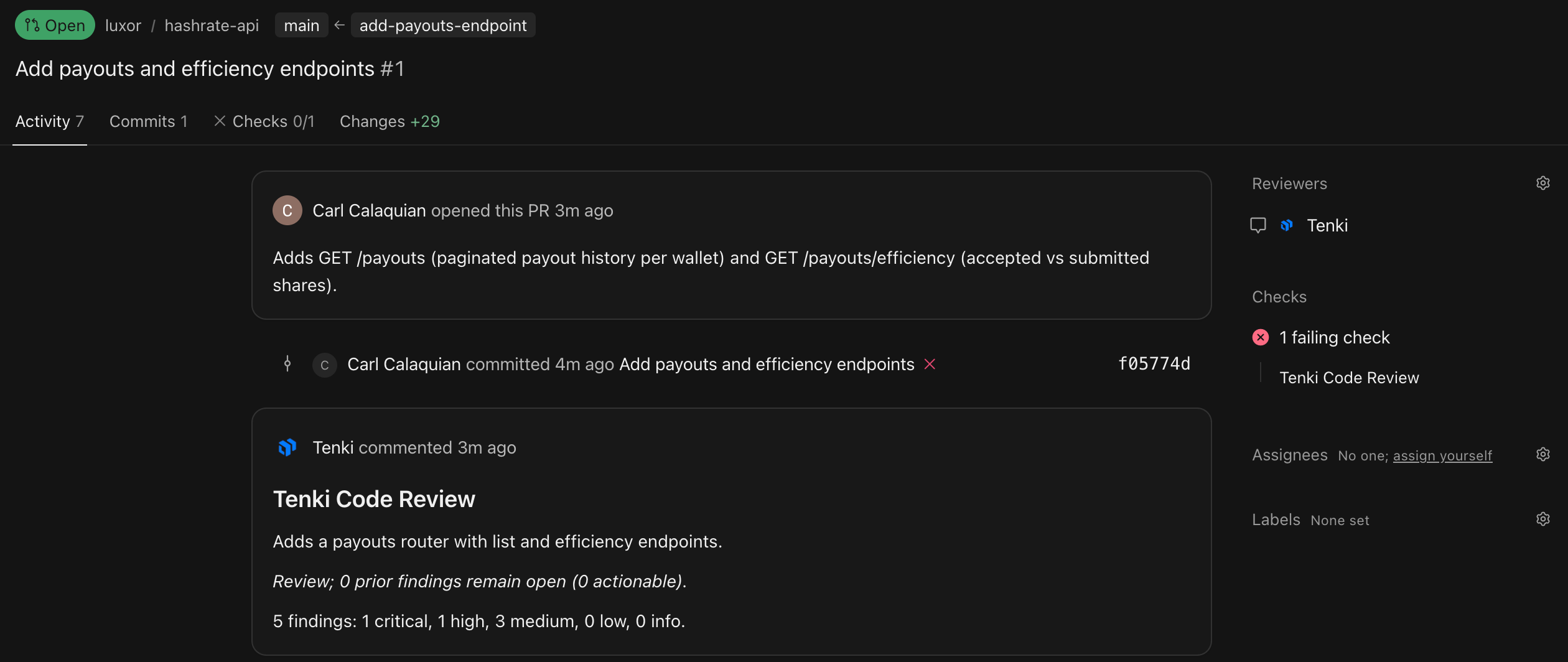
- The summary is a status comment that reads "Tenki is reviewing this pull request…" while the review runs, then lists the summary and a count of findings by severity.
- Findings are threads on the lines they apply to, each with a suggested fix and a link to the lines on cursor.com. The Prompt for AI Agents block is included only when Comment Detail Level is Detailed.
- The Tenki Code Review check fails while Critical, High, or Medium findings are open.
- To dismiss a finding, reply in its thread with a phrase such as "false positive" or "won't fix".
See Cursor Origin for details.
Reporting scope
Tenki only reports issues that:
- Are introduced by this PR
- Could cause bugs, security risks, or instability
- Can be addressed within the PR